When OCR Learns to Rebuild: Unisound U1-OCR Converts Images and PDFs into Editable PowerPoint Files in One Click, Ushering in a New Era of Intelligent Document Reconstruction
A carefully crafted PowerPoint proposal exists only as a PDF, while a critical presentation survives only as screenshots. Change a single line of copy or replace one image, and the entire deck must be rebuilt from scratch. This is a recurring workplace frustration for countless professionals.
At its core, this problem is not simply about converting file formats. Traditional tools can recognize document content only at a surface level. Truly efficient conversion requires AI to understand page logic, break down the layout, and accurately reconstruct a flattened static file as a structured, editable PowerPoint presentation.
In the era of document intelligence OCR 3.0, represented by U1-OCR, the object of recognition has expanded from characters and lines of text to the full document page. Beyond reading words, the system must also understand layout, structure, styles, visual logic, and content architecture.
Recently, Unisound upgraded its U1-OCR foundation model for document intelligence and officially launched the IMG2PPT intelligent conversion feature. Built on the U1-OCR document intelligence engine, IMG2PPT reconstructs content from static JPG, PNG, and PDF files as natively editable PowerPoint presentations. Text boxes, images, lists, shapes, tables, and other elements become native, editable PowerPoint objects. This marks OCR's progression from single-purpose content recognition to a new stage of intelligent understanding and structural reconstruction.
1. Threefold Advancement: From Recognition to Editable Reconstruction
Following the technical progression from recognition to layout analysis to understanding to editable reconstruction, IMG2PPT extends full-page document understanding into true editability. Centered on usability, editability, and reusability, it moves beyond the limitations of most image-to-PowerPoint tools, which merely imitate the visual appearance while losing the native structure. Each technical advance becomes a benefit users can directly experience.
Highlight 1: Document-Level Global Understanding (Recognition & Layout)
By combining text, image, and layout information, the system treats the entire page as a single document object. It identifies titles, body text, lists, images, icons, shapes, tables, and backgrounds, then reconstructs the grouping, alignment, and hierarchy among them. Traditional OCR stops at character perception and extracts isolated fragments of text. Document intelligence OCR 3.0 understands the visual logic and content architecture of complex pages, including multi-column layouts, mixed text and images, card-based compositions, and multi-level headings. It reads a complete page layout, not a disconnected column of words.
Highlight 2: Layout Fidelity with Element-Level Editability (Understanding)
The converted result goes beyond correct text. It also reconstructs element positions, page layout, fonts, font sizes, colors, and alignment. Content that can be structured is preferentially rebuilt as independent elements, while complex visual content retains its overall appearance, balancing layout consistency with the need for subsequent editing.
Highlight 3: Reconstruction of Native Elements and Structured Components (Editable Reconstruction)
The output is neither a full-page image nor a simple text extraction. Text, images, lists, and structurally identifiable shapes and tables are rebuilt as native PowerPoint elements. Structural information such as list levels, bullets, and table rows and columns is also restored, eliminating the need to recreate these elements during editing.
Users can directly revise copy, replace assets, adjust layouts, and change color schemes without starting from scratch, substantially improving efficiency when iterating past proposals, customizing versions for clients, or refreshing brand visuals.
2. Proven in Practice: Lossless Reproduction of Complex, Information-Dense Layouts
For complex PowerPoint layouts frequently encountered in the workplace, IMG2PPT demonstrates powerful structured reconstruction and accurately supports the conversion of information-dense, multi-component pages.
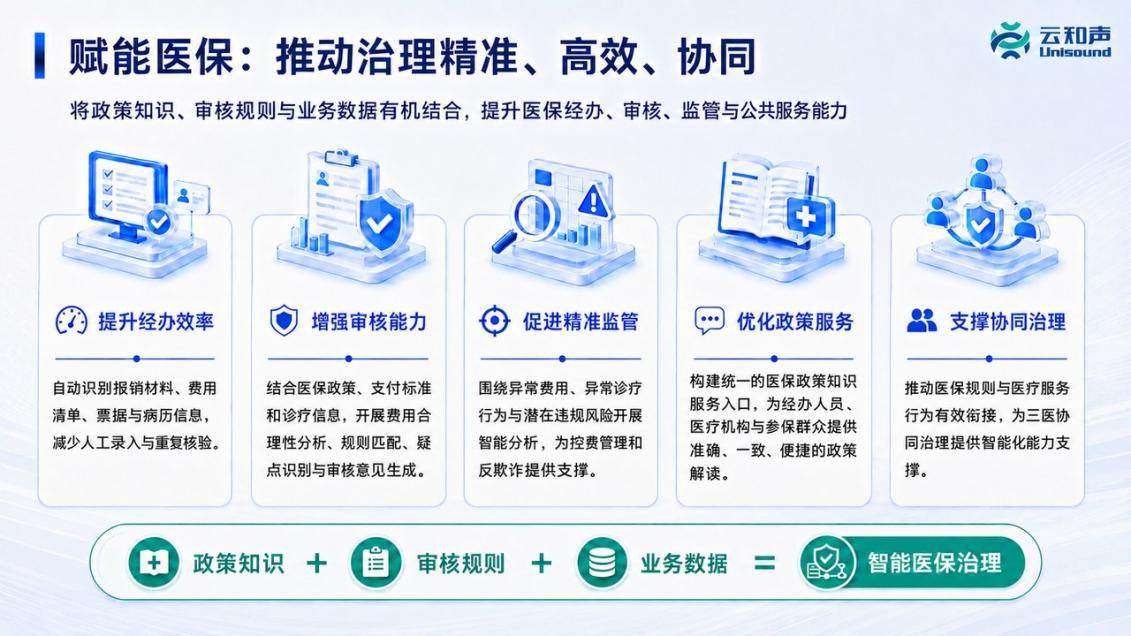
Scenario 1: Accurate Reconstruction of Information-Dense, Multi-Component Pages
Input Image
IMG2PPT Output
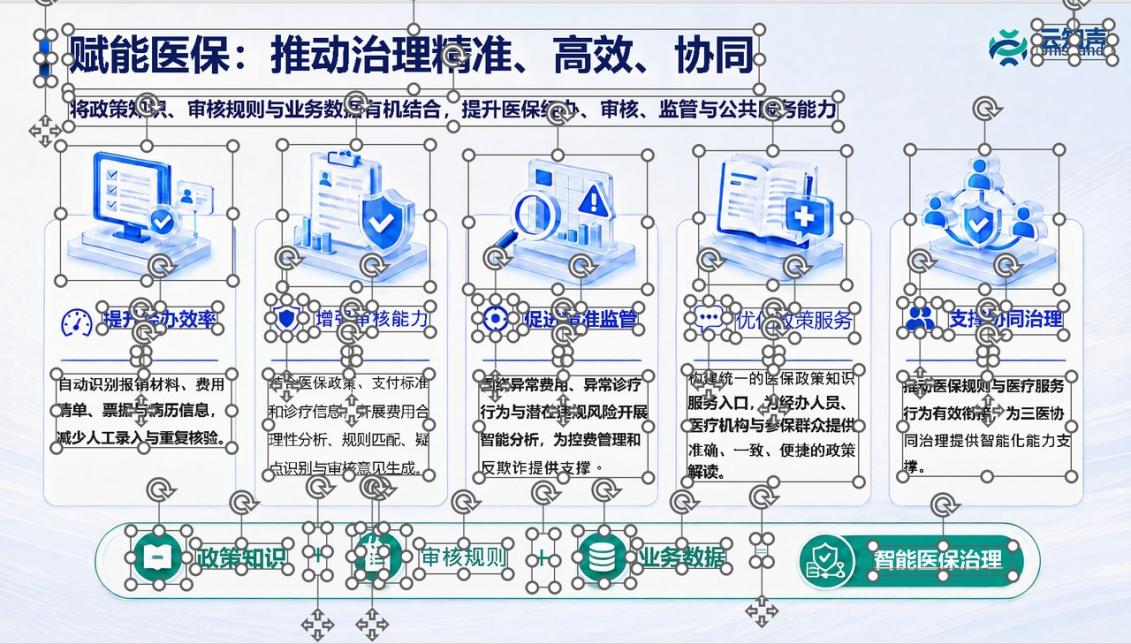
Consider a healthcare insurance governance proposal page containing a primary title, subtitle, multi-column icons, explanatory text, and decorative graphics. Its information density is high and its content hierarchy is complex. After IMG2PPT conversion, every item is separated into an independent editable object while the original column layout and hierarchical relationships are fully preserved. Users can directly change the client name, module copy, and icon colors.
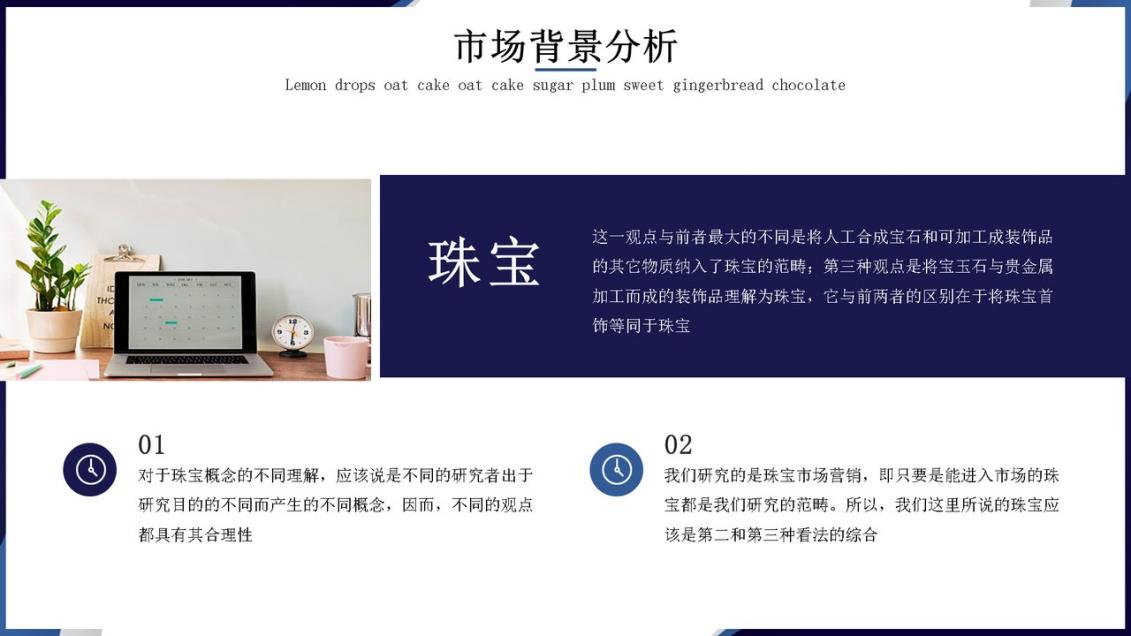
Scenario 2: Complete Reconstruction of Complex Text-Image Layouts
Input Image
IMG2PPT Output
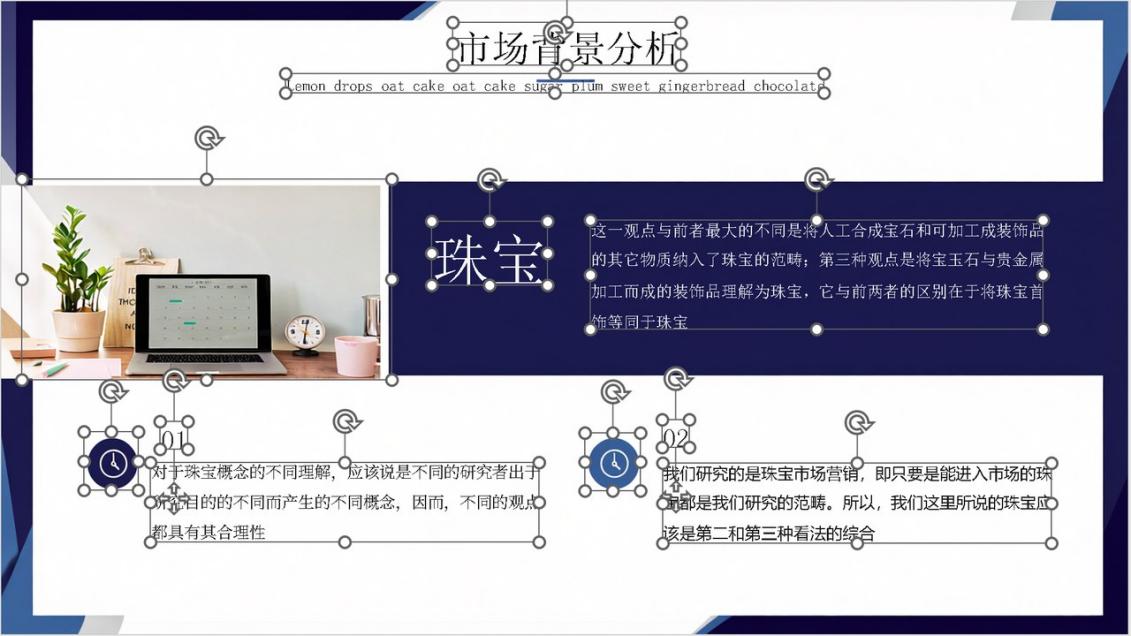
Consider a market background analysis page that combines a large title, subtitle, product image, dark content area, numbered icons, and two columns of explanatory text. The layout relationships among images, text, and decorative shapes are tightly integrated. After IMG2PPT conversion, the title, image, color blocks, icons, and explanatory text are separated into independent editable objects, while the original sectioning, alignment, and color style are preserved as closely as possible. Users can directly replace the image, revise the analysis, adjust the numbered modules, and modify the visual style.
3. Leading Across Five Dimensions: Structured Reconstruction Creates a Generational Advantage
Real-world performance is supported by professional evaluation data. IMG2PPT was compared with mainstream competitors across five core dimensions: editability, layout consistency, information accuracy, structured component reconstruction, and stable compatibility. IMG2PPT achieved an overall score of 4.30 out of 5, leading mainstream competitors by 0.38 points.
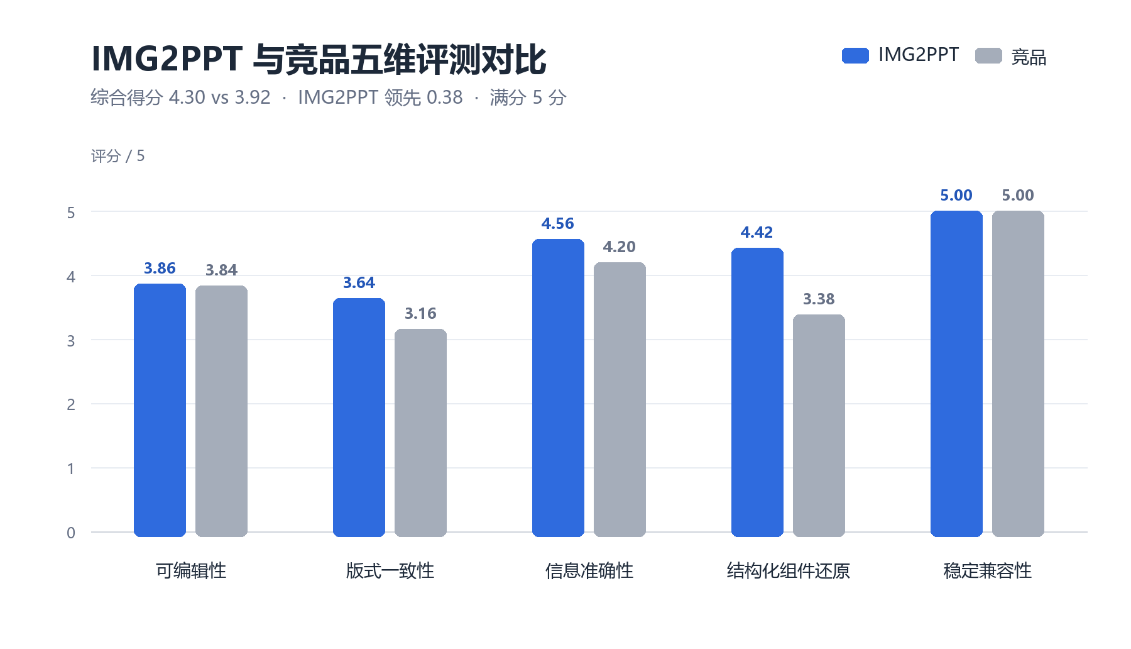
Structured component reconstruction scored 4.42, 1.04 points above mainstream competitors - the largest gap among the five dimensions. This reflects the system's progression beyond text recognition into understanding and reconstructing lists, tables, shapes, and other document components, and validates IMG2PPT's core advantage: it not only recognizes text, but also fully preserves the native structural relationships among tables, lists, and modules, delivering truly lossless conversion that is ready for direct reuse.
4. Revitalizing Legacy Assets: Awakening Enterprises' Dormant Static Content
In everyday office work, having the content but not the source file is a common problem. Past proposals may exist only as PDFs, handoffs from colleagues may include only PowerPoint screenshots, and older presentation assets may have no original files. These materials can be viewed but not edited or reused, leaving large volumes of valuable workplace content idle.
In the OCR 3.0 era, the IMG2PPT intelligent conversion feature released with Unisound U1-OCR provides an efficient way to reactivate legacy static documents. It rapidly reconstructs PDFs, PowerPoint screenshots, and image-based layouts as editable PPTX files, supporting copy replacement, asset updates, layout adjustments, and brand refreshes so older content can be iterated quickly instead of recreated from scratch.
For enterprises, the feature can reactivate accumulated PDFs and image-based proposal materials at scale. It brings idle static documents into enterprise template libraries, asset repositories, and knowledge-asset systems, transforming fixed workplace content into editable, reusable, and transferable digital assets.
From recognition to understanding and editability, IMG2PPT completes the full journey: upload an image or PDF and receive an immediately editable PowerPoint page. This marks Unisound's U1-OCR foundation model for document intelligence advancing from document recognition to document understanding and reconstruction. Unisound will continue advancing AI tools for more efficient document work.